# Backtesting Setup

## Preparing for Your First Backtest

Setting up a proper backtest is crucial for getting reliable results. This guide walks you through everything you need to know to configure BananaEA for testing.

{% hint style="success" %}
**Goal**: Create a realistic test environment that mimics live trading conditions as closely as possible.
{% endhint %}

***

## Pre-Backtest Checklist

Before starting your backtest, ensure:

* [ ] **EA Installed**: BananaEA .ex4 file in `MQL4/Experts/` folder
* [ ] **Historical Data**: Sufficient price history downloaded
* [ ] **Broker Settings**: Spread and commission configured realistically
* [ ] **Parameters Set**: Input parameters configured or preset loaded
* [ ] **Test Period Selected**: Date range covering appropriate market conditions
* [ ] **Modeling Quality**: "Every Tick" selected for accurate results

***

## Step 1: Install BananaEA

### Locating the EA File

You'll receive BananaEA as a compiled `.ex4` file:

```
BananaEA.ex4
```

### Installation

**1. Copy EA to MT4 Folder**:

```
1. Open MT4 Data Folder: File → Open Data Folder
2. Navigate to: MQL4 → Experts
3. Copy BananaEA .ex4 file into this folder
4. Restart MT4 (or refresh Navigator: right-click Navigator → Refresh)
```

**2. Verify Installation**:

```
1. Open MT4 Navigator (Ctrl+N)
2. Expand "Expert Advisors" section
3. Look for BananaEA in the list ✅
```

{% hint style="success" %}
**EA Appears in Navigator**: If you see BananaEA in the Expert Advisors list, installation is successful and it's ready for backtesting!
{% endhint %}

***

## Step 2: Download Historical Data

### Check Available History

1. Open chart for your test symbol (e.g., GER40.r)
2. Open desired timeframe (e.g., H1)
3. Scroll left to see how far back history goes
4. Aim for at least **2+ years** of data

### Download More History \[Important]

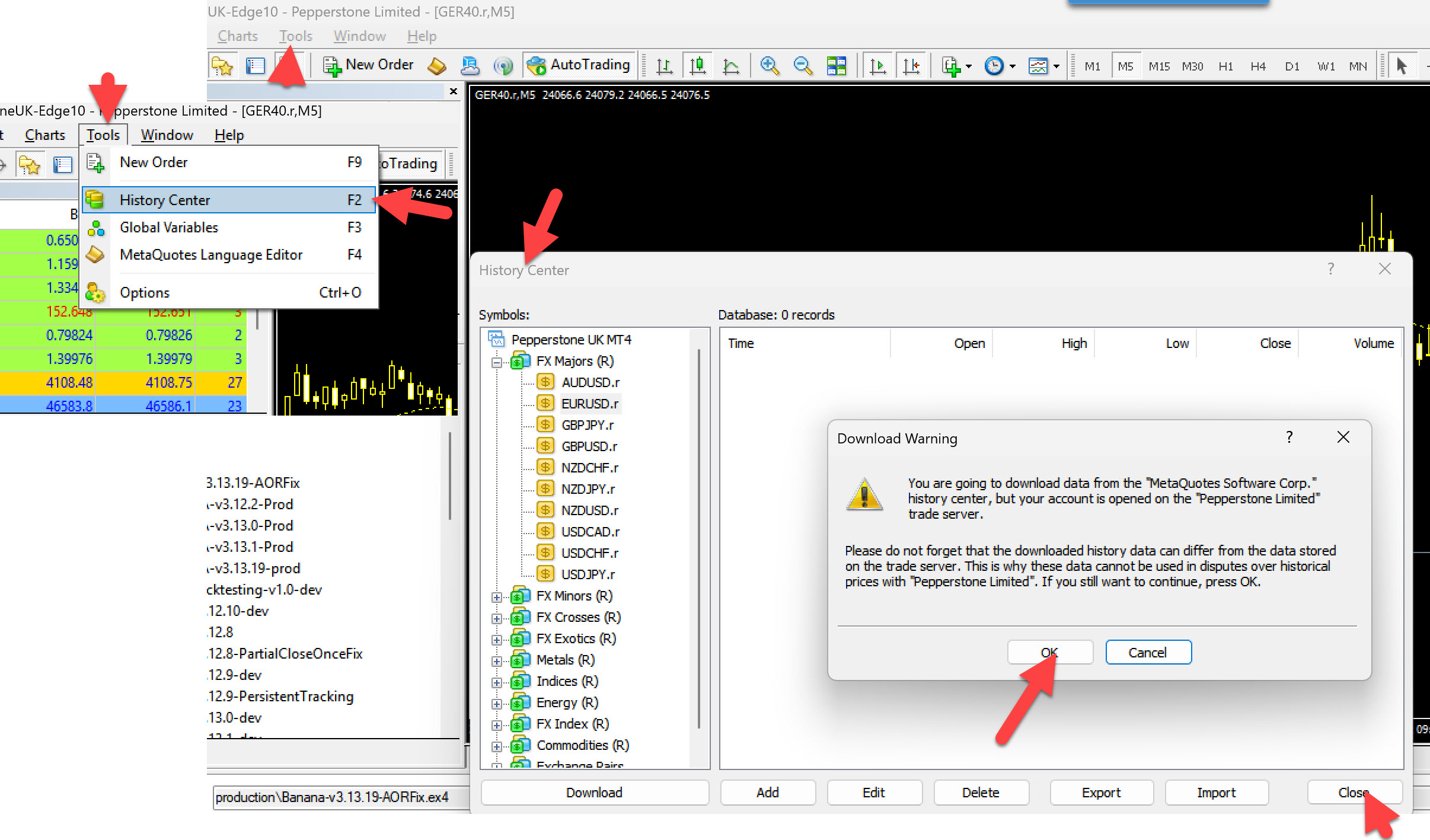
**Method 1: History Center (Best)**

```
1. Tools → History Center (F2) [Unfortunately MT4 Lacks History for Indices]
2. Find your symbol in list
3. Select timeframe (e.g., 1 Hour)
4. Click "Download" button
5. Wait for download to complete
6. Close History Center
```

<figure><img src="https://445469373-files.gitbook.io/~/files/v0/b/gitbook-x-prod.appspot.com/o/spaces%2FzPFbTIAo9zpPxaN6LSgQ%2Fuploads%2Fgit-blob-570cb0955ed0181fa136580618c7f29b55286db3%2FBacktesting-Setup-3.jpg?alt=media" alt="Strategy Tester Basic Settings"><figcaption><p>Strategy Tester Basic Settings</p></figcaption></figure>

**Method 2: Scrolling Back**

```
1. Open chart (e.g., GER40.r H1)
2. Hold Home key or scroll left continuously
3. MT4 loads more history automatically
4. Slow but works for recent history
```

**Method 3: Import from File**

```
If you have .hst files from data provider:
1. Tools → History Center
2. Select symbol and timeframe
3. Click "Import"
4. Select .hst file
5. Verify import successful
```

### Data Quality Check

After downloading, verify:

```
Open chart for test symbol/timeframe
→ Scroll through history visually
→ Check for gaps (missing bars)
→ Verify prices look realistic
→ Ensure continuous data (no large jumps in time)
```

{% hint style="danger" %}
**Poor Data = Unreliable Results**: Gaps, missing bars, or corrupted data will produce meaningless backtest results. Always verify data quality first.
{% endhint %}

***

## Step 3: Configure Strategy Tester Settings

### Basic Configuration

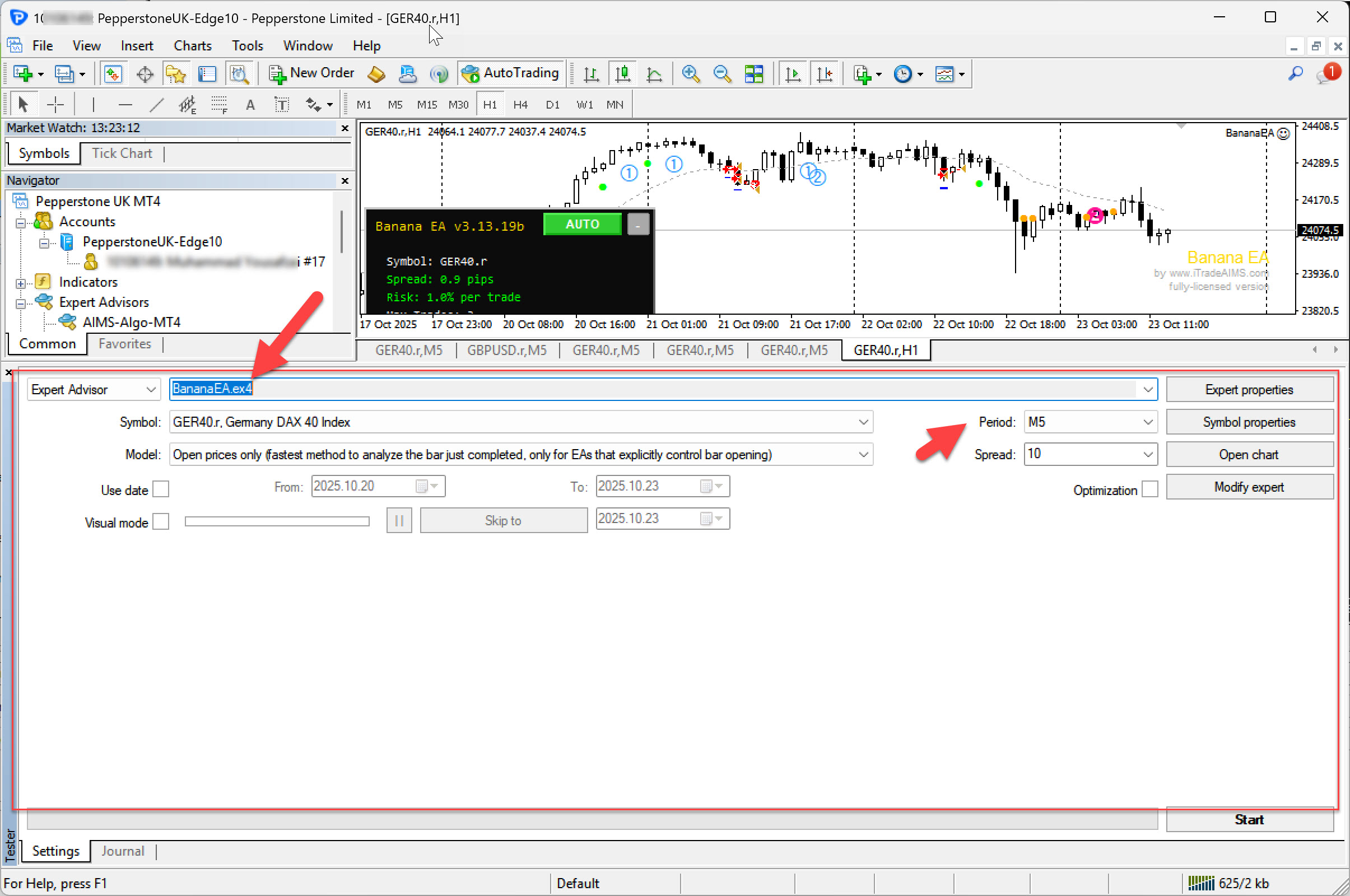
Open Strategy Tester (`Ctrl+R`) and configure:

**Expert Advisor**: Select BananaEA\
**Symbol**: GER40.r (or your preferred symbol)\
**Period**: H1 (recommended for BananaEA)\
**Model**: Every Tick (for accurate results)\
**Spread**: 10-15 points i.e 1 to 1.5 pips (realistic for DAX)

<figure><img src="https://445469373-files.gitbook.io/~/files/v0/b/gitbook-x-prod.appspot.com/o/spaces%2FzPFbTIAo9zpPxaN6LSgQ%2Fuploads%2Fgit-blob-79346c38f611686c6b3e7890f860677c0aa113b3%2FBacktesting-Setup-2.jpg?alt=media" alt="Strategy Tester Basic Settings"><figcaption><p>Strategy Tester Basic Settings</p></figcaption></figure>

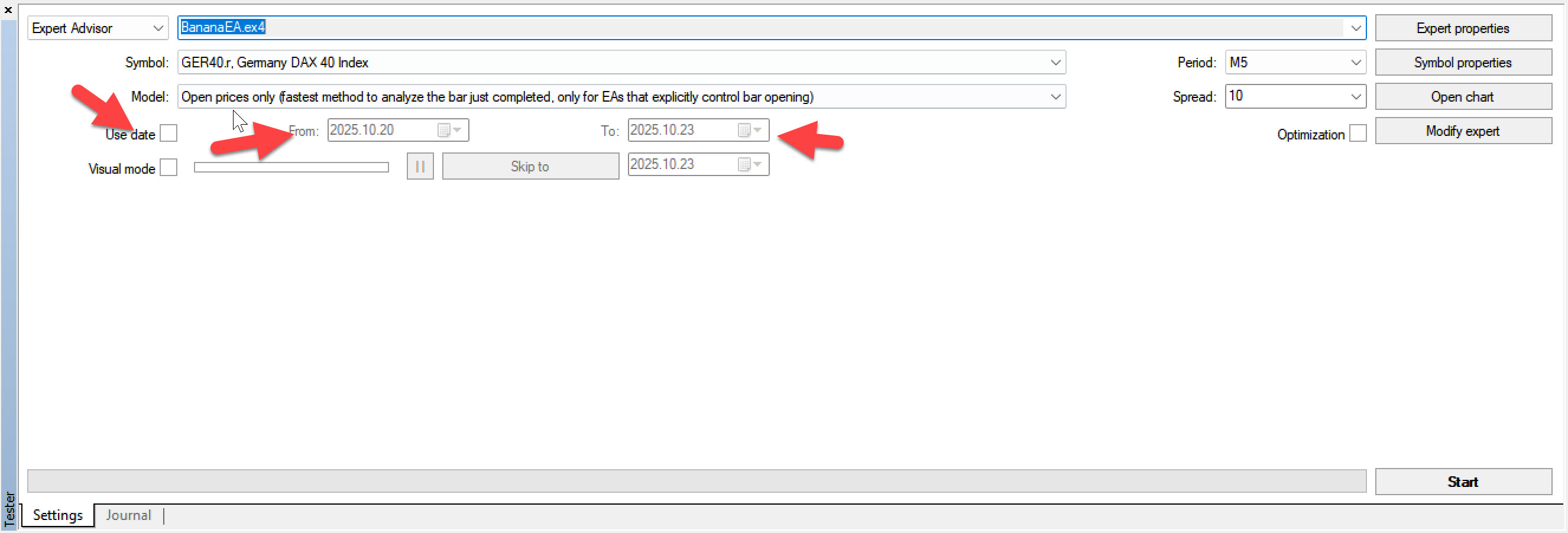
### Date Range Selection

**Conservative Approach (Recommended)**:

```
From: 2023.01.01 (2 years ago)
To:   2025.01.01 (or today's date)

Duration: 2 years
Market Conditions: Mix of trends, ranges, volatility
```

**Comprehensive Approach (Advanced)**:

```
From: 2020.01.01 (5+ years ago)
To:   2025.01.01

Duration: 5+ years
Market Conditions: Includes COVID crash, recovery, recent trends
```

<figure><img src="https://445469373-files.gitbook.io/~/files/v0/b/gitbook-x-prod.appspot.com/o/spaces%2FzPFbTIAo9zpPxaN6LSgQ%2Fuploads%2Fgit-blob-92d9661c986b06ca324057d00034fc2433fcd269%2FBacktesting-Setup-4.jpg?alt=media" alt="Strategy Tester Date Range Settings"><figcaption><p>Strategy Tester Date Range Settings</p></figcaption></figure>

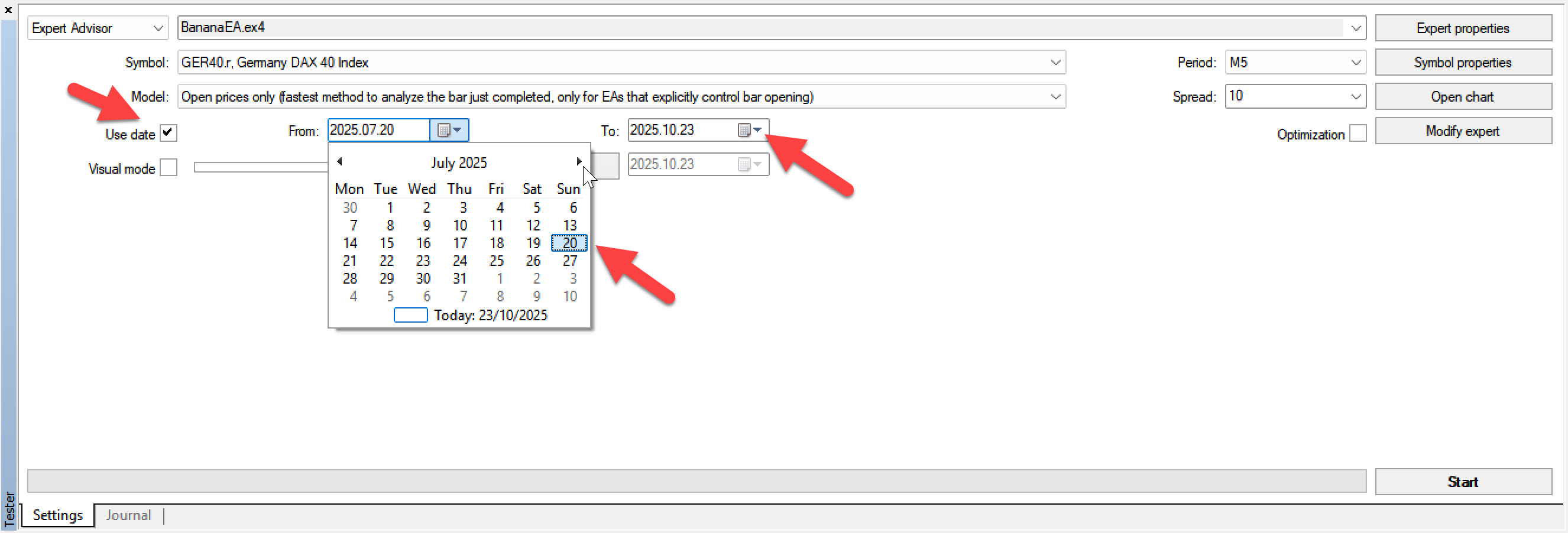
**Quick Screening (Initial Testing)**:

```
From: 2024.07.01 (6 months ago)
To:   2025.01.01

Duration: 6 months
Purpose: Quick parameter validation
```

<figure><img src="https://445469373-files.gitbook.io/~/files/v0/b/gitbook-x-prod.appspot.com/o/spaces%2FzPFbTIAo9zpPxaN6LSgQ%2Fuploads%2Fgit-blob-71041e6d1b7d703144427583548efdba479bbe67%2FBacktesting-Setup-5.jpg?alt=media" alt="Strategy Tester Date Range Settings"><figcaption><p>Strategy Tester Date Range Settings</p></figcaption></figure>

{% hint style="info" %}
**Recommendation**: Start with 6 months for quick screening, then extend to 2+ years for validation.
{% endhint %}

***

## Step 4: Configure EA Parameters

### Option A: Use Default Parameters

**When to Use**:

* First-time testing
* Evaluating baseline performance
* Comparing changes against known baseline

**How**: Simply leave all parameters at their default values (shown in Inputs tab).

***

### Option B: Load Preset Configuration

**When to Use**:

* Testing optimized parameter sets
* Comparing different strategies (conservative, aggressive)
* Replicating published backtest results

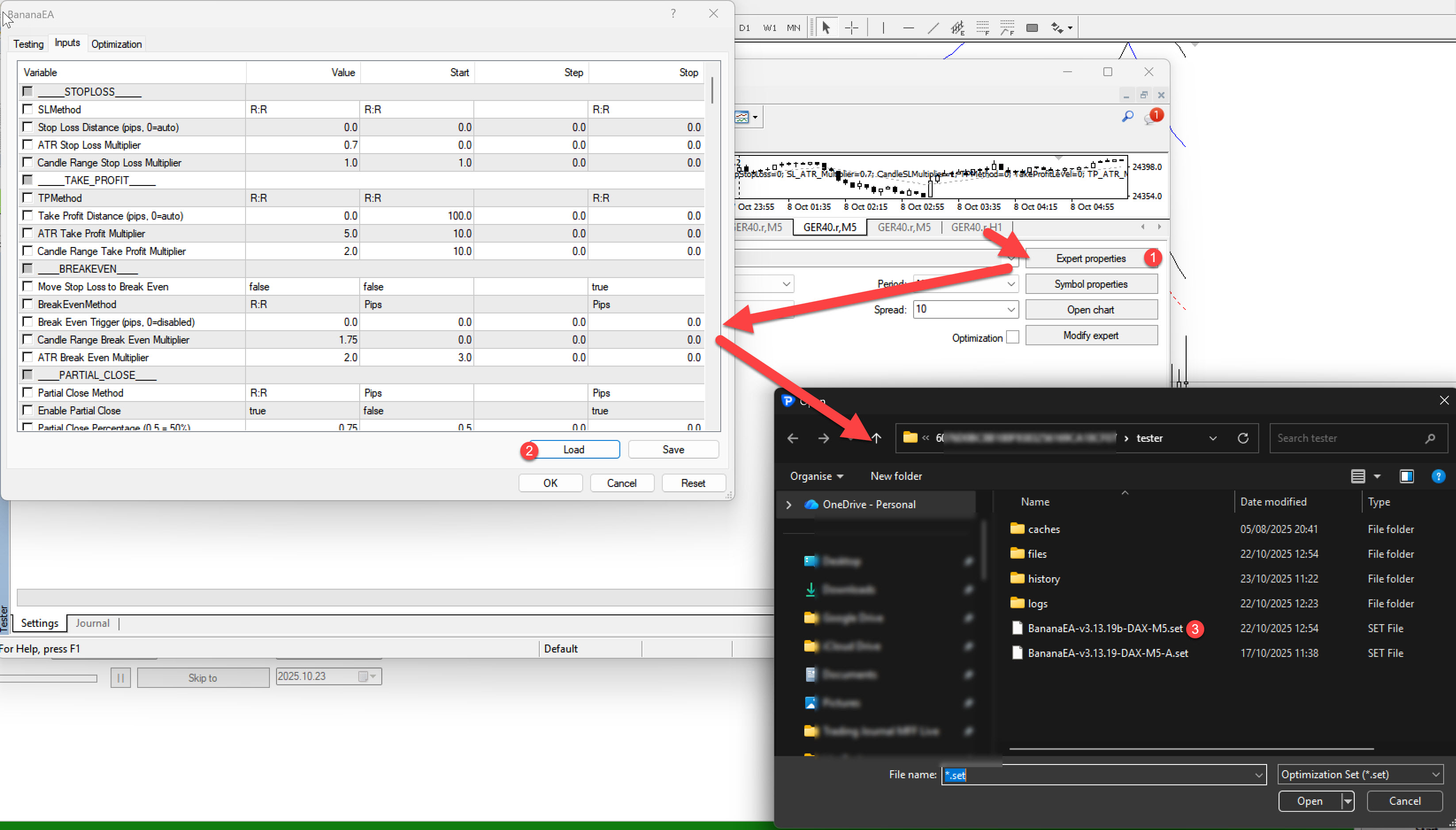
**How to Load Preset**:

```
1. In Strategy Tester, click "Inputs" tab
2. Right-click in inputs area
3. Select "Load"
4. Navigate to: MQL4/Presets/
5. Select preset file (e.g., "BananaEA-DAX-H1-Conservative.set")
6. Click "Open"
7. Verify parameters loaded correctly
```

**Available Presets** (Example):

* `BananaEA-DAX-M5-Default.set` - Lower risk, stable
* `BananaEA-DAX-H1-Balanced.set` - Default recommended
* `BananaEA-DAX-H1-Aggressive.set` - Higher risk/reward

<figure><img src="https://445469373-files.gitbook.io/~/files/v0/b/gitbook-x-prod.appspot.com/o/spaces%2FzPFbTIAo9zpPxaN6LSgQ%2Fuploads%2Fgit-blob-cc188ddc3f89cac6c357ad0ed04695ad6467f4f6%2FBacktesting-Setup-6.jpg?alt=media" alt="Example EA parameter configuration in Strategy Tester"><figcaption><p>Example EA parameter configuration in Strategy Tester</p></figcaption></figure>

***

### Option C: Manual Configuration

**When to Use**:

* Testing specific parameter changes
* Optimization follow-up
* Custom strategy validation

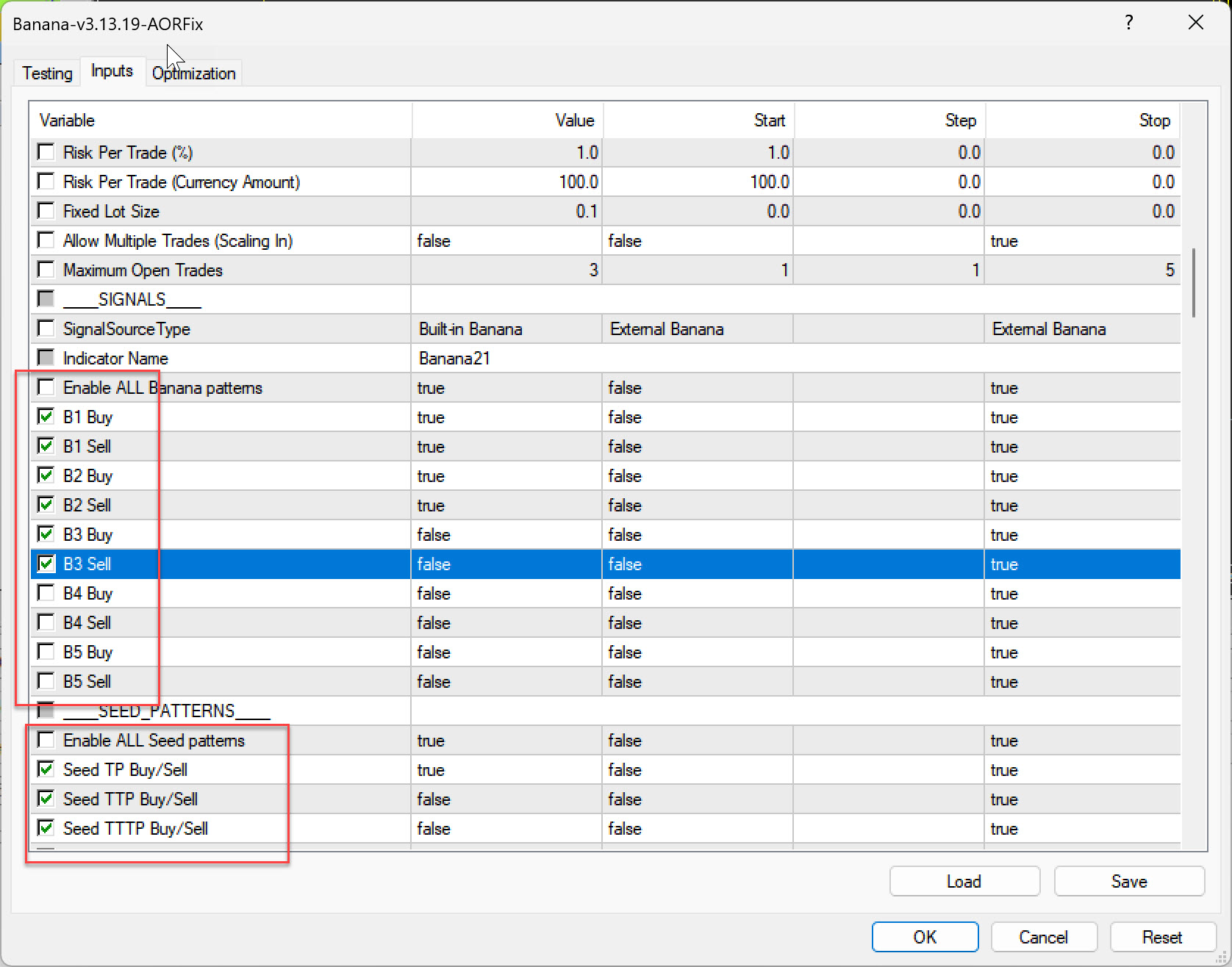
**Key Parameters to Configure**:

#### Risk Management

```
RiskPercent = 1.0        // Risk per trade (1-3% typical)
RiskMethod = 0           // 0=Risk%, 1=RiskAmount, 2=FixedLots
MaxOpenTrades = 1        // Maximum simultaneous positions
```

#### Entry Settings

```
SignalSourceType = 1     // 1=Internal Banana patterns
Use Banana Signals = true // Enable Banana pattern signals
Use Seed Signals = false // Disable Seed patterns
```

#### Stop Loss / Take Profit

```
SLMethod = 0             // 0=CandleRange, 1=ATR, 2=Fixed
TPMethod = 0             // 0=CandleRange, 1=ATR, 2=Fixed
CandleRangeSL = 10       // Candles to include for SL
CandleRangeTP = 20       // Candles to include for TP
```

#### Trade Management

```
UseSLtoBE = true         // Enable break-even
BreakEvenMethod = 2      // 2=ATR-based (recommended)
UsePartialClose = true   // Enable partial profit taking
UseTrailing = true       // Enable trailing stop
```

<figure><img src="https://445469373-files.gitbook.io/~/files/v0/b/gitbook-x-prod.appspot.com/o/spaces%2FzPFbTIAo9zpPxaN6LSgQ%2Fuploads%2Fgit-blob-cdb35c9bcb45b062f01a0227f72d3430385a2b26%2FBacktesting-Setup-1.jpg?alt=media" alt="Example EA parameter configuration in Strategy Tester"><figcaption><p>Example EA parameter configuration in Strategy Tester</p></figcaption></figure>

***

## Step 5: Configure Broker Costs

### Spread Configuration

**Finding Your Broker's Spread**:

```
1. Open live chart for symbol
2. Look at Market Watch or chart info
3. Note current spread (e.g., 1.5 pips = 15 points)
4. Add buffer for peak times (+50%)
5. Set in Strategy Tester: 20 points
```

**Conservative Approach** (Recommended): Use **higher** spread than average to account for:

* Peak hour widening
* News event spikes
* Slippage simulation
* Realistic live conditions

**Example for DAX (GER40)**:

```
Typical spread: 1.0-1.5 pips (10-15 points)
Peak spread: 2.0-3.0 pips (20-30 points)
Backtest setting: 20 points (conservative but realistic)
```

***

### Commission & Swap

**Enable Commission** (if your broker charges):

```
Strategy Tester → Settings tab
→ Advanced options
→ Commission: [X.XX] per lot/side
```

**Example Commission Rates**:

* Prop firms: $0-5 per side per lot
* Retail brokers: Often spread-only (no commission)
* ECN brokers: $2-7 per side per lot

**Swap/Rollover** (if holding overnight):

```
MT4 automatically uses symbol's swap rates
→ No manual configuration needed
→ Check: Symbols → Properties → Swap Long/Short
```

{% hint style="info" %}
**BananaEA Typical**: Intraday trading style usually closes before day end, minimal swap impact. However, always enable for accuracy.
{% endhint %}

***

## Step 6: Set Initial Deposit

**Field**: Initial Deposit (in Strategy Tester settings)

**Recommendations**:

**Match Your Real Capital**:

```
If trading with $10,000 → Set initial deposit to $10,000
If trading with $5,000 → Set initial deposit to $5,000
```

**Why This Matters**:

* Realistic drawdown assessment
* Accurate lot size calculation
* Margin requirement validation
* Risk percentage accuracy

**Typical Amounts**:

* **$5,000**: Small account, conservative risk
* **$10,000**: Standard account, balanced risk
* **$25,000**: Larger account or prop trading
* **$50,000+**: Professional/institutional

{% hint style="warning" %}
**Don't Test with Unrealistic Amounts**: Testing with $1M when you have $5K gives misleading results. Risk management scales differently.
{% endhint %}

***

## Step 7: Configure Leverage

**Field**: Leverage (in Strategy Tester settings)

**BananaEA Recommendations**:

**Conservative**: 1:30 leverage\
**Standard**: 1:50 leverage\
**Aggressive**: 1:100 leverage

**Match Your Broker**: Check your live account leverage and use same in backtests.

***

## Step 8: Double-Check Everything

### Pre-Launch Checklist

Before clicking **\[Start]**, verify:

**EA Configuration**:

* [ ] Correct EA selected in dropdown
* [ ] Parameters loaded/set correctly
* [ ] Magic number unique (if testing multiple EAs)

**Symbol & Timeframe**:

* [ ] Correct symbol (GER40.r for DAX testing)
* [ ] Correct period (H1 recommended)
* [ ] Historical data sufficient (2+ years)

**Test Settings**:

* [ ] Modeling quality: "Every Tick"
* [ ] Spread realistic (15-20 points for DAX)
* [ ] Date range appropriate (2+ years)
* [ ] Initial deposit matches real capital

**Advanced Settings**:

* [ ] Commission configured (if applicable)
* [ ] Leverage matches broker
* [ ] Optimization OFF (unless optimizing)
* [ ] Visual mode OFF (for full speed)

***

## Common Setup Mistakes

### Mistake 1: Using Wrong Spread

❌ **Problem**: Spread set to 0 or 1 point\
✅ **Solution**: Use realistic spread (15-20 points for DAX)

### Mistake 2: Insufficient Data

❌ **Problem**: Testing on 1-3 months of data\
✅ **Solution**: Use minimum 6-12 months, ideally 2+ years

### Mistake 3: Wrong Modeling Quality

❌ **Problem**: Using "Open Prices Only" for final validation\
✅ **Solution**: Use "Every Tick" mode for accurate results

### Mistake 4: Mismatched Capital

❌ **Problem**: Testing with $100K when trading with $5K\
✅ **Solution**: Match initial deposit to real account size

### Mistake 5: Ignoring Trading Costs

❌ **Problem**: Not including commission or swap\
✅ **Solution**: Configure all broker costs for realistic results

***

## Quick Setup Guide (Checklist)

Copy this workflow for consistent backtests:

```
1. [ ] Install BananaEA .ex4 file in MQL4/Experts folder
2. [ ] Download 2+ years historical data
3. [ ] Open Strategy Tester (Ctrl+R)
4. [ ] Select BananaEA from EA dropdown
5. [ ] Symbol: GER40.r (or preferred)
6. [ ] Period: H1
7. [ ] Model: Every Tick
8. [ ] Spread: 20 points
9. [ ] Dates: 2023.01.01 to 2025.01.01
10. [ ] Initial Deposit: $10,000 (or your amount)
11. [ ] Load preset or configure parameters
12. [ ] Enable commission (if applicable)
13. [ ] Verify leverage matches broker
14. [ ] Click [Start]
```

***

## Next Steps

Now that your backtest is properly configured:

1. **Run Your Backtest** → [Running Backtests](https://itradeaims.gitbook.io/banana-ea/backtesting-and-optimization/backtesting-optimization/running-backtests)
2. **Analyze Results** → [Analyzing Results](https://itradeaims.gitbook.io/banana-ea/backtesting-and-optimization/backtesting-optimization/analyzing-results)
3. **Try Optimization** → [Running Optimizations](https://itradeaims.gitbook.io/banana-ea/backtesting-and-optimization/backtesting-optimization/running-optimizations)

{% hint style="success" %}
**Professional Approach**: Taking time to set up correctly saves hours of troubleshooting later. A well-configured backtest produces reliable, actionable results!
{% endhint %}

***

## Related Resources

* [MT4 Strategy Tester Guide](https://itradeaims.gitbook.io/banana-ea/backtesting-and-optimization/backtesting-optimization/strategy-tester-guide) - Interface walkthrough
* [Introduction to Backtesting](https://itradeaims.gitbook.io/banana-ea/backtesting-and-optimization/backtesting-optimization/introduction) - Fundamentals
* [Best Practices & Tips](https://itradeaims.gitbook.io/banana-ea/backtesting-and-optimization/backtesting-optimization/best-practices) - Professional workflow